| After you have downloaded or copied the zip files to your harddrive,
create two folders somewhere under the same folder. Once called SongLyrics and the other called Resources (Named exactly as displayed here). I
have created them under the Peter folder which is under the Docs folder on my D drive. If
you are unsure of how to create folders ask one of your kids to show you how. 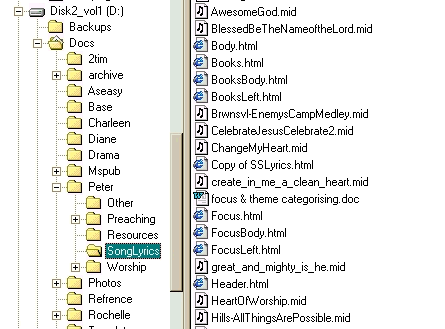
Once you have the two folders created then double-click the zip files and extract them
to the appropriate folders - SongLyrics.zip to SongLyrics and Resources.zip to Resources.
Now we need a way of kicking off the program. I have created a shortcut on my desktop to
do this, but you could just as easily add it to the Start Menu. You can see my shortcut
here...
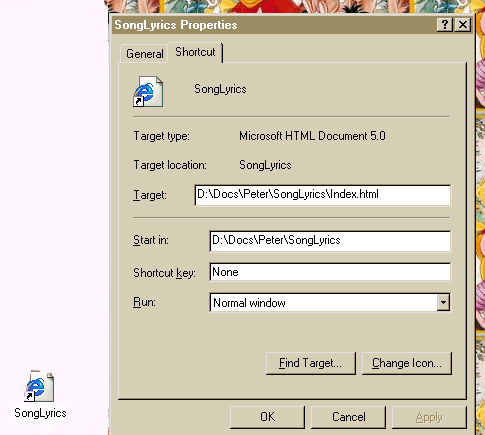
Just set the "Target" to be where you extracted the files to and the "Start in" to be that
folder and click OK. Then when you double-click the icon on the destop it will start up.
From the SongLyrics you can get to the resources or you can create a shortcut for that
too. Just remember that the Target will be Resources\Index.htm. |